


How to Print Real-Time Weight and Barcode From Your Existing Weighing Scale
Many factories already own a working platform scale, bench scale, floor scale, crane scale or industrial weighing machine. The scale measures weight correctly, but the operator still writes the reading by hand, types it into a computer, prepares a label separately and updates inventory later. This raises a practical question: how can you print real-time weight and barcode labels directly from your existing weighing scale?
In many cases, the complete scale does not need to be replaced. If the existing digital indicator provides a compatible data output, the weighing machine can be connected to a computer, touchscreen terminal, label printer or weighing software. The system can then capture stable weight automatically, combine it with product information and print a barcode or QR-code label immediately.
A more advanced setup can also save every weighment, create inventory, generate production records, scan items during dispatch and exchange approved data with ERP or SAP software. Punit selects the correct solution after checking the scale indicator, printer requirement, label format, operating process and required level of automation.
This guide explains the complete process in simple language. It covers the hardware needed, communication methods, label printing, barcode creation, stable-weight capture, inventory integration, common problems and the difference between a basic printer connection and a complete Punit Weighing Scale With Printer system.
Watch the Punit Weighing Scale With Printer Live Demo
See how Punit captures live weight, prints barcode labels, creates inventory and completes barcode-based dispatch from one connected weighing system.
WhatsApp Punit for a Live DemoView Punit Weighing Scale With Printer
Direct Answer: How Do You Print Weight From a Weighing Scale?
To print weight from a weighing scale reliably, Punit can connect a compatible digital indicator to Punit weighing software through RS-232, USB, Bluetooth, Wi-Fi or Ethernet. The software reads the live value, waits for stable weight, adds product or order information, generates a barcode and sends the approved label or receipt to a connected printer.
Can an Existing Weighing Scale Print Weight and Barcode Labels?
Yes, an existing weighing scale can often be used for real-time weight and barcode printing, provided that its digital indicator can communicate with another device. The scale platform and load cells measure the physical load. The indicator receives the load-cell signal, converts it into a readable weight and may provide that weight through a communication port.
Common communication options include RS-232 serial output, USB serial connection, Bluetooth, Wi-Fi, Ethernet, manufacturer-specific digital output and external serial-to-network or serial-to-Bluetooth converters.
If a compatible output is available, the weight can be transferred to software. The software reads the live value, determines whether the reading is stable, adds the selected product details and sends the final label to a printer.
The existing scale may not be suitable when the indicator has no data output, uses an undocumented proprietary protocol, transmits unstable or incomplete data, or cannot be safely modified. In that situation, the indicator may need to be replaced while retaining the platform and load cells, or a complete connected weighing system may be more practical.
What Is Required to Print Weight From a Weighing Scale?
A real-time weight printing system normally requires five main components. The exact hardware changes according to the capacity, environment and type of label or document.
1. A Working Weighing Scale
The weighing scale may be a tabletop scale, bench scale, platform scale, floor scale, pallet scale, crane scale or another industrial weighing system. It must be mechanically stable, correctly installed and suitable for the product being weighed.
Capacity alone is not enough. The scale should also have suitable readability for the process. A 1,000 kg platform may be appropriate for heavy pallets but may not reliably detect the difference of one small component inside a box. Capacity and readability must be selected from the actual application.
2. A Compatible Digital Weighing Indicator
The indicator is the most important part when connecting an existing weighing machine with a printer. It should provide a documented communication output. For an RS-232 connection, the following information is normally required:
- Baud rate
- Data bits
- Parity
- Stop bits
- Continuous or request-based transmission
- Weight string format
- Stable and unstable status characters
- Unit information
- Positive, negative and overload format
A sample raw-data string is extremely useful. It helps the software developer identify which characters represent the weight, unit and stability condition.
3. A Computer or Touchscreen Terminal
A computer, industrial touchscreen or Android terminal runs the weighing application. The operator uses it to select a product, enter or scan additional information, view live weight, confirm the transaction and print the label.
A basic system may use a small computer near the scale. A more integrated product may use an industrial touchscreen mounted with the indicator and printer. Punit’s touchscreen configuration combines live weight capture, label printing, product selection, inventory and cloud reporting in one operator interface.
4. A Suitable Printer
The printer must match the required output. A thermal receipt printer is suitable for compact weight slips, bills or internal receipts. A barcode label printer is required when the output must be attached to a product, bag, box, roll, coil, bobbin, drum or pallet.
- Thermal receipt printer: for small slips and transaction bills.
- Direct-thermal label printer: for selected short-life adhesive labels without a ribbon.
- Thermal-transfer label printer: for more durable labels using a ribbon.
- Standard document printer: for larger reports, packing lists or delivery documents.
Label life, surface, moisture, heat, oil, dust, abrasion and barcode density should be considered before selecting the printer and consumables.
5. Weighing and Label Printing Software
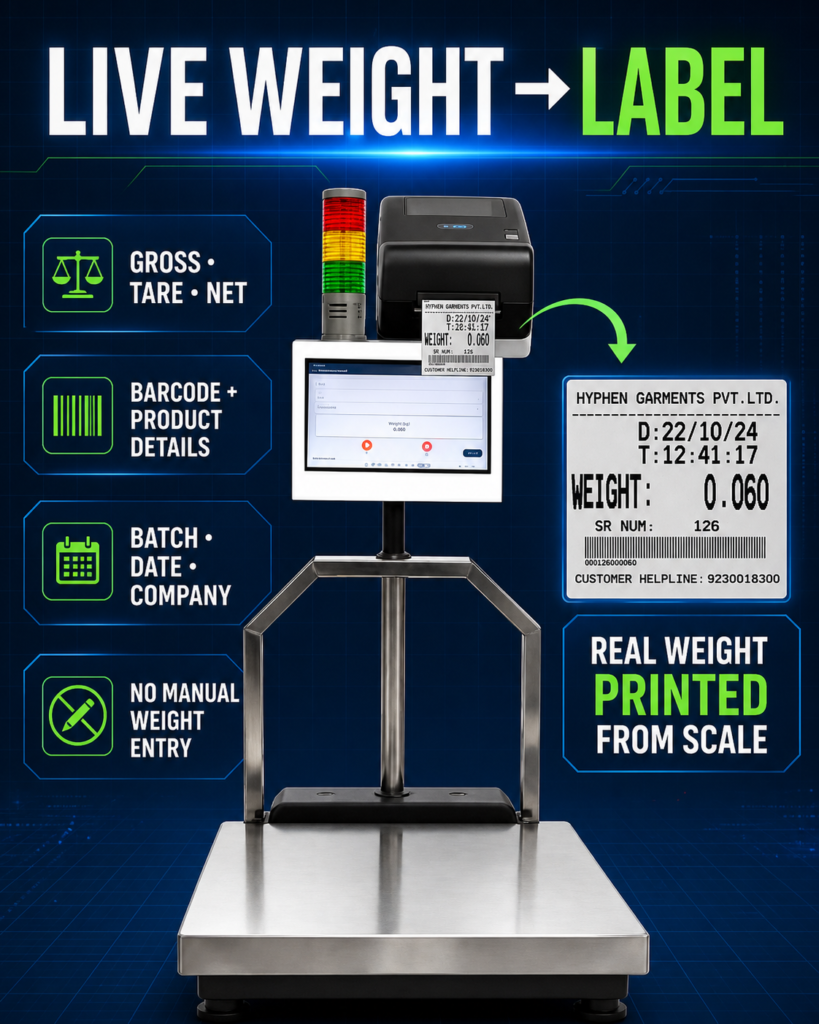
Punit weighing software is the layer that connects the live weight with product and business information. It can display live weight, wait for stability, apply tare, calculate net weight, select the correct label template, generate a barcode and save the transaction.
A basic application may only capture and print. A complete weighing scale with printer and inventory management system can also create stock, track each barcode, generate dispatch records and provide cloud reports.
How Real-Time Weight Travels From the Scale to the Printer
The weighing scale does not normally print a complete industrial label by itself. It first sends the measured value to the application. The application then converts that value into a complete transaction.
- The product is placed on the weighing platform.
- The load cells generate an electrical signal according to the applied load.
- The digital indicator converts the signal into a weight value.
- The indicator transmits the value through RS-232, USB, Bluetooth, Wi-Fi or Ethernet.
- The weighing software receives and parses the data.
- The software checks whether the reading is stable.
- The operator selects or scans the product, order, batch or customer.
- The system applies the configured tare and calculates net weight where required.
- The system generates a product barcode or unique transaction barcode.
- The approved label is sent to the connected printer.
- The completed transaction is saved locally, in the cloud or in an ERP-connected database.
This process can take only a few operator actions when products and label formats are already configured. The main advantage is that the printed weight comes from the same live transaction stored by the software. The operator does not need to copy the number manually.
Step-by-Step: How to Print Real-Time Weight From a Weighing Scale
Step 1: Identify the Indicator Model and Available Port
Check the front, back and technical manual of the digital indicator. Look for ports marked RS-232, serial, COM, USB, printer, Ethernet, LAN or Bluetooth. Record the manufacturer and model number.
Do not assume that every visible serial connector transmits live weight. Some ports are intended for service, calibration, a remote display or a specific printer. Confirm the function through the manual or manufacturer.
Step 2: Obtain the Communication Protocol
The protocol explains how the indicator sends data. Ask the scale supplier for the communication manual and a sample output string. If the protocol is unavailable, a technician may capture the raw serial stream for evaluation, but documented communication is always preferable.
The software must know where the numeric weight begins and ends, whether a minus sign is possible, how decimal places are represented and how stable weight is indicated.
Step 3: Connect the Indicator to the Terminal
Use the correct cable and converter. A standard-looking connector does not always use standard wiring. Incorrect wiring can prevent communication and may damage equipment in poorly designed installations.
For longer industrial distances, Ethernet or a suitable isolated converter may be more reliable than an unprotected serial cable. Route communication cable away from high-power motors, welding cables and sources of electrical noise where practical.
Step 4: Configure the Communication Settings
Set the software port to match the indicator. Baud rate, parity, data bits and stop bits must agree. If one setting is different, the application may receive unreadable characters or no data.
During commissioning, the software should display raw data temporarily. This helps the technician confirm that the indicator is transmitting the expected value.
Step 5: Parse and Display Live Weight
The application removes unnecessary characters and displays the numeric value and unit. It should also show whether the scale is connected and whether the reading is stable.
The software must not mistake a partial data string for a final weight. A robust connector handles incomplete strings, repeated transmission, connection loss and reconnection.
Step 6: Define the Stable-Weight Rule
Printing every fluctuating value would create incorrect labels. The system should print only after the scale reports a stable condition or after an approved software stability rule is satisfied.
The best method is normally to use the indicator’s stability status when it is available and reliable. A software rule may be used where necessary, but it should be tested with the actual scale and product.
Step 7: Configure Gross, Tare and Net Weight
Gross weight is the total load placed on the scale. Tare is the weight of the container, pallet, bobbin, tray or packaging. Net weight is the material weight after tare deduction.
The tare may be captured from an empty container, entered by an authorised operator, stored against a container or bobbin master, selected from a predefined list or received from an ERP or production order.
The label can print gross, tare and net weight together, or only the approved values required by the process.
Step 8: Create the Label Template
The label template defines the physical size and all printed fields. Typical fields include company name and logo, product name, product code, gross weight, tare weight, net weight, quantity, batch, date, operator, customer, order number, barcode, QR code and a unique serial number.
Print a physical sample and scan it using the actual barcode scanner. A label that looks clear on a computer screen may not scan reliably after printing or after being applied to a curved, dusty or reflective surface.
Step 9: Test Normal and Error Conditions
Do not test only one correct transaction. Test unstable weight, disconnected cable, wrong unit, zero weight, negative weight, overload, printer offline, duplicate barcode, cancelled print and authorised reprint.
The operator should receive a clear message for every condition. The system should not silently save a transaction when the label failed to print or print repeated labels without recording the reprint.
Step 10: Train Operators and Protect Settings
Operators should know how to select the product, place material correctly, wait for stability, replace labels and respond to common errors. Administrators should control product masters, tare values, label formats and communication settings.
A normal operator should not be able to change the scale protocol or approved label design accidentally.
Use Punit to Convert Your Existing Weighing Scale Into a Complete Printing System
Punit Instrument can evaluate your current indicator, connect compatible weighing hardware, configure real-time weight capture, design barcode labels and add inventory, dispatch, cloud or ERP modules. Send the indicator model, scale capacity and required label format to Punit for technical confirmation.
Contact Punit on WhatsAppRequest Punit Demo and Quotation
Watch the Punit Weighing Scale With Printer Live Demo
See how Punit captures live weight, prints barcode labels, creates inventory and completes barcode-based dispatch from one connected weighing system.
WhatsApp Punit for a Live DemoView Punit Weighing Scale With Printer
How to Print a Barcode From a Weighing Scale
To print a barcode from a weighing scale, the system needs both the weight and a barcode value. The barcode may represent the product or one unique transaction.
Product Barcode
A product barcode identifies the product type. Multiple packages of the same product may use the same code. This is useful for product selection and general stock handling, but it does not identify an individual roll, box or pallet.
Unique Transaction Barcode
A unique barcode is generated for one specific weighment. It may be linked to product, weight, batch, date, operator and inventory status. This is preferable when individual packages must be traced or prevented from being dispatched twice.
Barcode With Embedded Data vs Reference Barcode
A barcode can contain multiple fields directly, but very long data creates a dense code that may be harder to print and scan. In many industrial systems, the barcode contains a short unique reference. The software uses that reference to retrieve the full transaction.
The correct structure depends on whether the barcode will be used only inside the factory, by a customer, in an ERP or across a formal supply chain. Customer-specific and GS1-related requirements should be reviewed before finalizing the code.
Can Weight Be Printed Automatically Without Pressing a Button?
Yes, automatic printing is possible. The software can trigger a label after the weight becomes stable and all required conditions are satisfied. Automatic printing should be designed carefully to prevent repeated labels while the same product remains on the scale.
- Weight above a minimum threshold
- Stable status for the required duration
- Product and order selected
- All mandatory fields completed
- Weight within the approved range
- No existing transaction for the same capture cycle
- Weight removed or changed sufficiently before the next print
Some processes are better with operator confirmation. When the operator must inspect the product, select a customer or verify a batch, a deliberate print button provides useful control.
Printing Only When Weight Is Within the Approved Range
A connected system can work as a check-weighing and label-printing station. The product master stores a target, minimum or maximum weight. When the package is placed on the scale, the application compares the stable value with the approved range.
- If the weight is within range, the system accepts the transaction and prints the label.
- If the weight is below range, it shows an underweight condition and blocks printing.
- If the weight is above range, it shows an overweight condition and blocks printing.
This is useful for auto parts, component boxes, packed goods and repetitive production where weight can help detect missing or additional material. The method must be validated using actual product and packaging variation. A scale cannot reliably detect one missing part if normal variation is greater than the weight of that part.
For a complete industrial version with check weighing and label printing, review the industrial weighing scale with printer solution.
How Weighing Scale With Printer and Inventory Management Works
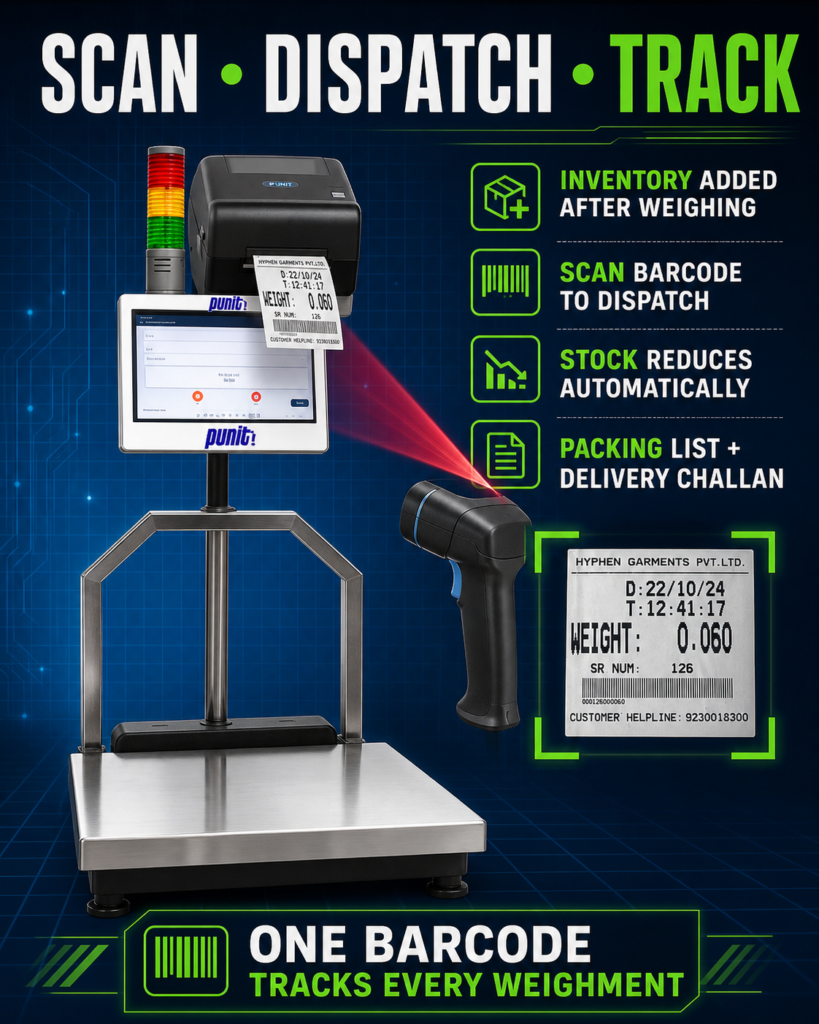
Printing a label solves product identification, but inventory management extends the value of the same transaction. Instead of only printing the weight, the software creates stock from the accepted weighment.
- Select the product, batch, order or supplier.
- Capture stable gross, tare and net weight.
- Generate a unique barcode label.
- Save the product as raw material, work in progress or finished goods.
- Assign a warehouse or storage location where required.
- Scan the barcode during transfer, production or dispatch.
- Deduct the exact item from available inventory after approved dispatch.
Stock can be maintained at product level, batch level or unique-barcode level. Barcode-level inventory is useful for rolls, coils, bobbins, bundles, bags, boxes, drums and pallets because every physical package remains individually identifiable.
The Punit Weighing Scale With Printer System and Inventory Management connects weighing, barcode labels, stock updates, dispatch scanning and reporting in one workflow.
Watch the Punit Weighing Scale With Printer Live Demo
See how Punit captures live weight, prints barcode labels, creates inventory and completes barcode-based dispatch from one connected weighing system.
WhatsApp Punit for a Live DemoView Punit Weighing Scale With Printer
Use Punit to Convert Your Existing Weighing Scale Into a Complete Printing System
Punit Instrument can evaluate your current indicator, connect compatible weighing hardware, configure real-time weight capture, design barcode labels and add inventory, dispatch, cloud or ERP modules. Send the indicator model, scale capacity and required label format to Punit for technical confirmation.
Contact Punit on WhatsAppRequest Punit Demo and Quotation
What Punit Weighing Scale With Printer Does
Punit Weighing Scale With Printer is a configurable industrial system that combines weighing hardware, touchscreen operation, label printing, barcode scanning and software. It is designed for factories that need more control than a normal scale and separate printer.
- Live weight capture from the scale
- Gross, tare and net weight calculation
- Touchscreen product and order selection
- Barcode and QR-code label printing
- Product-wise custom label formats
- Unique transaction serialization
- Inventory inward and stock tracking
- Barcode-based dispatch verification
- Automatic inventory deduction after dispatch
- Production and warehouse reports
- Cloud data synchronization
- Offline or hybrid operation
- ERP and SAP integration where technically approved
- KG-to-PCS support for suitable consistent products
- Customer-specific workflow customization
The product is used in steel, aluminium, brass, copper, wire, cable, polymer, packaging, warehouse, logistics, auto-parts and engineering applications. The exact scale, printer and software modules are selected according to the customer’s material and workflow.
Can You Print a Receipt or Bill Instead of a Barcode Label?
Yes. The same live weight can be printed on a thermal receipt, weight bill or weighment slip. A receipt may include transaction number, date, customer, product, gross, tare, net, quantity, rate, operator and barcode.
For this type of application, see the receipt printing platform weighing scale.
Where a formal tax invoice, delivery challan or statutory document is required, the final format and data source should be approved by the customer’s accounting or ERP team. A weighing application can print the approved format, but it should not invent legal, tax or compliance information.
RS-232, USB, Bluetooth or Wi-Fi: Which Connection Is Best?
RS-232
RS-232 remains common in industrial weighing indicators. It is simple and reliable over appropriate distances when correctly wired and protected from electrical noise. It requires a serial port or USB-to-serial converter on modern computers.
USB
USB may be convenient over short distances. Some indicators appear as a virtual serial port, while others require a manufacturer driver. USB is not automatically better than RS-232; compatibility depends on the device and operating system.
Bluetooth
Bluetooth is useful for mobile or cable-free applications over a limited range. Test it inside the actual factory because metal structures, interference and device sleep behaviour can affect reliability.
Wi-Fi or Ethernet
Network connections are useful for longer distances, centralized systems and multi-scale deployments. Ethernet provides a wired connection, while Wi-Fi avoids data cabling but depends on coverage and security policy.
The best connection is the one supported reliably by the indicator and customer environment. Select it after reviewing distance, interference, mobility, network restrictions and maintenance responsibility.
Can Multiple Weighing Scales Print to One System?
Yes. Multiple scales can connect to one local server or centralized weighing platform. Each scale or terminal should have a unique identity so the transaction records which device captured the weight.
A centralized system may support multiple scales in one department, different scales for raw material, production and dispatch, multiple warehouses, multiple factories, central product masters, label templates, role-based access and ERP synchronization.
Where production cannot stop, a hybrid system can store transactions locally during temporary network failure and synchronize later.
Use Punit to Convert Your Existing Weighing Scale Into a Complete Printing System
Punit Instrument can evaluate your current indicator, connect compatible weighing hardware, configure real-time weight capture, design barcode labels and add inventory, dispatch, cloud or ERP modules. Send the indicator model, scale capacity and required label format to Punit for technical confirmation.
Contact Punit on WhatsAppRequest Punit Demo and Quotation
Common Problems When Connecting a Weighing Scale to a Printer
No Data Is Received
Possible causes include the wrong port, incorrect cable wiring, disabled indicator output, mismatched baud rate, damaged converter or another application using the same port.
Unreadable Characters Appear
This normally indicates mismatched serial settings or incorrect interpretation of the device protocol.
Weight Is Received but Is Not Stable
The software may be reading continuous values without checking the stability marker. Mechanical vibration, airflow, product movement or a damaged scale may also prevent stability.
The Decimal Point Is Wrong
The protocol may send a raw integer with an implied decimal, or the software may be applying the wrong unit or capacity configuration.
The Printer Produces Blank or Misaligned Labels
Check media type, sensor settings, label dimensions, ribbon orientation, printer language, calibration and template size.
The Barcode Does Not Scan
Possible causes include low contrast, insufficient quiet zone, code too dense for the label, poor printhead condition, wrong scanner type or applying the label to a curved surface.
The Same Label Prints Multiple Times
The automatic trigger may not include a release condition. The system should wait until weight is removed or changes sufficiently before allowing another automatic print.
Inventory Is Updated but the Label Fails
The transaction design should define when stock becomes final. A robust system records print status and provides controlled reprinting without creating duplicate stock.
Can Every Existing Scale Be Retrofitted?
No. Many can be connected, but compatibility must be evaluated. A retrofit is most practical when the existing platform and load cells are in good condition and the indicator has a stable, documented output.
- The indicator has no usable output
- The protocol is undocumented or locked
- The current scale is mechanically unsuitable
- The capacity or readability does not match the process
- The platform is damaged or unstable
- The required legal verification would be affected
- Multiple converters would make support difficult
- The customer needs an integrated touchscreen and printer enclosure
A technical evaluation should be completed before promising that an existing scale can be converted.
How to Select the Right Printer for Your Weighing Scale
| Requirement | Common Printer Choice | Main Consideration |
|---|---|---|
| Small weight slip or receipt | Thermal receipt printer | Paper width, print speed and transaction format |
| Short-life adhesive barcode label | Direct-thermal label printer | Heat-sensitive media and expected label life |
| Durable industrial barcode label | Thermal-transfer printer | Label and ribbon combination, environment and surface |
| Packing list or delivery document | Standard A4 document printer | Document size, network access and approved format |
Always test the final label with the actual product and scanner. A good laboratory print is not enough if the label fails after factory handling.
How Much Does It Cost to Add Printing to an Existing Scale?
The cost depends on the existing indicator, printer, terminal and software scope. A simple real-time receipt-printing system costs less than a touchscreen system with barcode labels, cloud inventory, dispatch scanning and ERP integration.
Main cost factors include indicator compatibility, indicator replacement, printer type, touchscreen, barcode scanner, product masters, label templates, offline or cloud software, inventory, dispatch, users, locations, ERP integration, custom reports, installation and support.
Share the indicator model, product, capacity, label sample and workflow before requesting a quotation.
Information to Share Before Asking for a Demo or Quotation
- Photograph and model number of the current weighing indicator
- Scale capacity and readability
- Platform dimensions and construction
- Available communication ports
- Indicator communication manual
- Product types and normal weight range
- Required gross, tare and net workflow
- Label or receipt dimensions
- All fields required on the print
- Barcode or QR-code format
- Need for product, batch, order or customer selection
- Inventory and dispatch workflow
- Number of scales, users and locations
- Cloud, offline or ERP requirement
- Factory environment and printer placement
Watch the Punit Weighing Scale With Printer Live Demo
See how Punit captures live weight, prints barcode labels, creates inventory and completes barcode-based dispatch from one connected weighing system.
WhatsApp Punit for a Live DemoView Punit Weighing Scale With Printer
Use Punit to Convert Your Existing Weighing Scale Into a Complete Printing System
Punit Instrument can evaluate your current indicator, connect compatible weighing hardware, configure real-time weight capture, design barcode labels and add inventory, dispatch, cloud or ERP modules. Send the indicator model, scale capacity and required label format to Punit for technical confirmation.
Contact Punit on WhatsAppRequest Punit Demo and Quotation
Frequently Asked Questions
How do I print weight directly from a weighing scale?
Use a compatible digital indicator to send live weight to weighing software through RS-232, USB, Bluetooth, Wi-Fi or Ethernet. The software waits for stable weight and sends the approved value to a receipt or label printer.
Can I connect a printer directly to my current weighing machine?
Some indicators support a specific direct printer, but advanced barcode labels normally require software to combine weight with product and transaction data. Compatibility must be confirmed for the exact indicator and printer.
How do I print a barcode from a weighing scale?
The weighing application captures stable weight, combines it with product or order data, generates a product or unique transaction barcode and prints the final label through a barcode printer.
Can the scale print gross, tare and net weight?
Yes. The system can capture or select tare, calculate net weight and print gross, tare and net according to the approved workflow.
Can I use my existing platform scale?
Often yes, if the platform is suitable and the indicator provides a compatible output. The scale and communication should be technically evaluated before confirmation.
Can the label print only after weight becomes stable?
Yes. Stable-weight status can be used as a mandatory condition before printing.
Can the system block printing when weight is out of range?
Yes. Product-specific minimum and maximum limits can prevent accepted-label printing for underweight or overweight packages.
Can it update inventory automatically?
Yes, when inventory management is included. An accepted weighment can create stock, and barcode scanning during dispatch can deduct the exact package.
Can it work without internet?
A local or hybrid application can continue weighing and printing during temporary internet loss and synchronize later when designed accordingly.
Can it connect with SAP or another ERP?
Yes, where the customer provides an approved API, middleware or data-exchange method. The exact integration depends on the ERP and business process.
Which printer is best for weight labels?
Direct thermal may suit selected short-life labels. Thermal transfer is generally evaluated for more durable industrial labels. The correct selection depends on label life, surface and environment.
Can Punit provide the complete scale, printer and software?
Yes. Punit can provide a complete touchscreen weighing scale with printer, barcode scanning, inventory, dispatch and reporting, or evaluate integration with a compatible existing scale.
Use Punit to Convert Your Existing Weighing Scale Into a Complete Printing System
Punit Instrument can evaluate your current indicator, connect compatible weighing hardware, configure real-time weight capture, design barcode labels and add inventory, dispatch, cloud or ERP modules. Send the indicator model, scale capacity and required label format to Punit for technical confirmation.
Contact Punit on WhatsAppRequest Punit Demo and Quotation
Conclusion
Printing real-time weight and barcode labels from a current weighing machine is possible when the scale indicator provides a compatible digital output. The basic solution requires the scale, a communication interface, software and a suitable printer. A more complete system adds product selection, stable-weight capture, tare management, barcode serialization, inventory, dispatch scanning and ERP integration.
The most important first step is not buying a printer. It is confirming how the existing indicator communicates and defining what the final transaction must contain. Once the protocol, label, workflow and software scope are clear, the scale can become a controlled industrial weighing and printing station.
For a ready industrial system or evaluation of your existing scale, review the Punit Weighing Scale With Printer, the Punit Weighing Scale With Printer and Inventory Management system, or contact Punit Instrument Pvt. Ltd. for a technical demonstration.
Call: +91 97253 53523
Request a demo: Submit your weighing and printing requirement
Watch the Punit Weighing Scale With Printer Live Demo
See how Punit captures live weight, prints barcode labels, creates inventory and completes barcode-based dispatch from one connected weighing system.
WhatsApp Punit for a Live DemoView Punit Weighing Scale With Printer
Use Punit to Convert Your Existing Weighing Scale Into a Complete Printing System
Punit Instrument can evaluate your current indicator, connect compatible weighing hardware, configure real-time weight capture, design barcode labels and add inventory, dispatch, cloud or ERP modules. Send the indicator model, scale capacity and required label format to Punit for technical confirmation.