

How Weighing Scale ERP & SAP Integration Connects Physical Weight With Business Data
Most factories already have weighing scales and ERP software. The real challenge is the gap between them. Punit Instrument Pvt. Ltd. uses Punit ERP to connect physical weighments with barcode labels, inventory, dispatch, reports and enterprise systems such as SAP.
Industrial weighing is often one of the first places where physical material becomes digital information.
A product, roll, coil, bundle, bag, carton or pallet is physically placed on a scale. The weighing system knows the actual weight. The ERP knows the order, material code, customer, batch and stock structure.
If those two systems are not connected, a person has to bridge the gap.
That is where delays, transcription errors and duplicate work can begin.
Punit Instrument Pvt. Ltd. approaches the problem differently:
The physical weighment becomes part of a controlled digital transaction instead of remaining an isolated number on the weighing indicator.
If you are evaluating the hardware used in these workflows, see the Punit Instrument Pvt. Ltd. Weighing Scale With Printer.
1. What Is Weighing Scale ERP Integration?
Weighing scale ERP integration is the process of connecting physical weight data from a compatible weighing system with the company’s enterprise software.
It is not simply “connecting a cable to SAP.” A reliable integration normally involves several layers:
- Compatible weighing hardware
- Stable-weight capture
- Product / material identification
- Customer / order / batch context
- Transaction logic
- Barcode / QR identity where required
- Inventory workflow
- API, middleware or other approved integration method
- Validation and acknowledgement
- Retry / pending-sync handling
- User permissions
- Audit history
The purpose is to make sure the ERP receives a meaningful business transaction rather than an unexplained raw weight value.
2. The Role of Punit ERP Between the Scale and Enterprise Software
Punit ERP by Punit Instrument Pvt. Ltd. acts as the operational layer around the physical weighing transaction.
The scale provides the actual weight. Punit ERP adds context such as:
- Product
- Material code
- Customer
- Sales order
- Production order
- Batch / lot
- Gross / tare / net
- Pieces / rolls / bags
- Barcode / QR
- Operator
- Date and time
- Inventory status
- Dispatch status
3. Architecture A: SAP or ERP Remains the Main System of Record
In many larger companies, SAP or another enterprise ERP should remain the master system.
A typical architecture can look like this:
In this model:
- SAP sends the product, order, batch or other required master data.
- Punit ERP presents the correct shop-floor workflow to the operator.
- The physical item is weighed.
- Punit ERP captures the actual stable weight.
- A barcode / QR label can be generated.
- The accepted transaction is returned to SAP / ERP.
This is useful when the enterprise system must remain the official system of record while Punit ERP controls the actual weighing operation.
4. Architecture B: Punit ERP Manages Operational Weighing and Inventory
Some businesses need Punit ERP to manage the operational layer more deeply.
In this architecture, Punit ERP can maintain:
- Weighments
- Barcode-wise stock
- KG + PCS / rolls / bags
- Inventory inward
- Inventory outward
- Dispatch
- Packing lists
- Cloud reports
Selected transactions can then be synchronized with the enterprise system according to the approved integration scope.
5. How Punit Instrument Pvt. Ltd. Can Integrate With SAP
SAP integration depends on the customer’s SAP environment, available APIs or middleware, network security and approved process design.
SAP / ERP → Punit ERP
Punit ERP → SAP / ERP
6. Why Direct Weight Capture Matters in ERP Integration
Without integration, a common process is:
With Punit Instrument Pvt. Ltd. direct weight capture:
This reduces unnecessary manual re-entry and makes the source of the transaction clearer.
7. Watch the Connected Weighing Workflow
All-in-One Weighing Scale With Printer — Full Demo
See live weight capture, barcode/QR label printing, inventory and the type of shop-floor transaction that can be connected to Punit ERP and enterprise software.
Check Weighing + Conditional Printing
Shows how a valid ERP transaction can be based on an accepted physical weight instead of every raw weighment.
8. ERP Integration Should Include Failure and Retry Logic
A serious integration design must consider what happens when something goes wrong.
Examples:
- The weighment is complete but the ERP API is temporarily unavailable.
- The internet or local network is down.
- SAP receives the request but acknowledgement is delayed.
- The same transaction is accidentally retried.
- An operator closes the screen before synchronization finishes.
A robust architecture may use:
- Unique local transaction IDs
- Pending-sync status
- Retry logic
- ERP acknowledgement status
- Duplicate-prevention logic
- Audit timestamps
- User traceability
9. Barcode and QR Codes Create a Physical-to-Digital Link
A barcode label can represent the connection between the physical product and its digital ERP transaction.
When scanned later, the system can identify:
- Product
- Batch
- Weight
- Pieces / quantity
- Inventory status
- Dispatch status
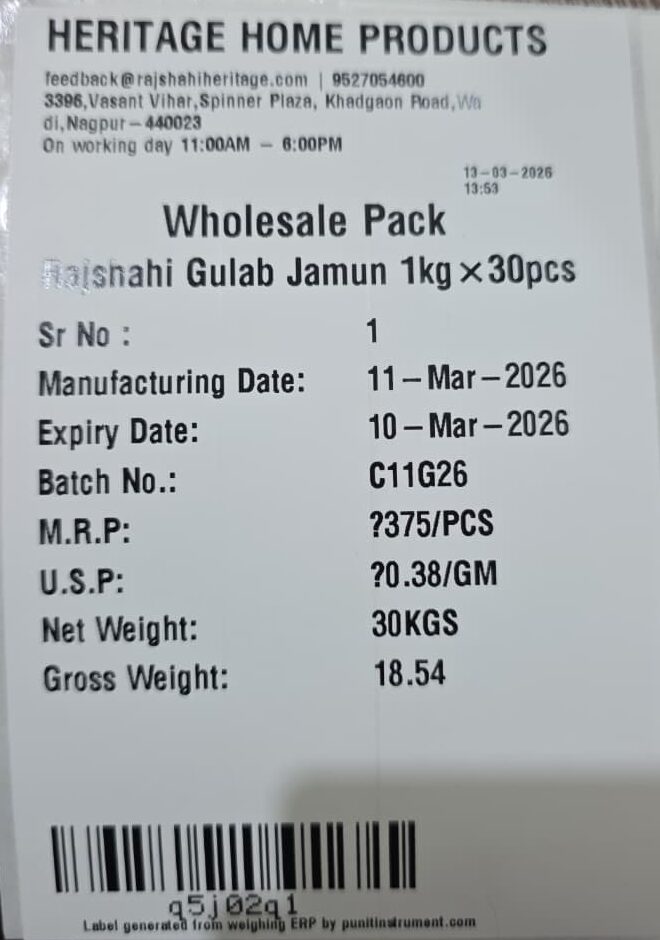
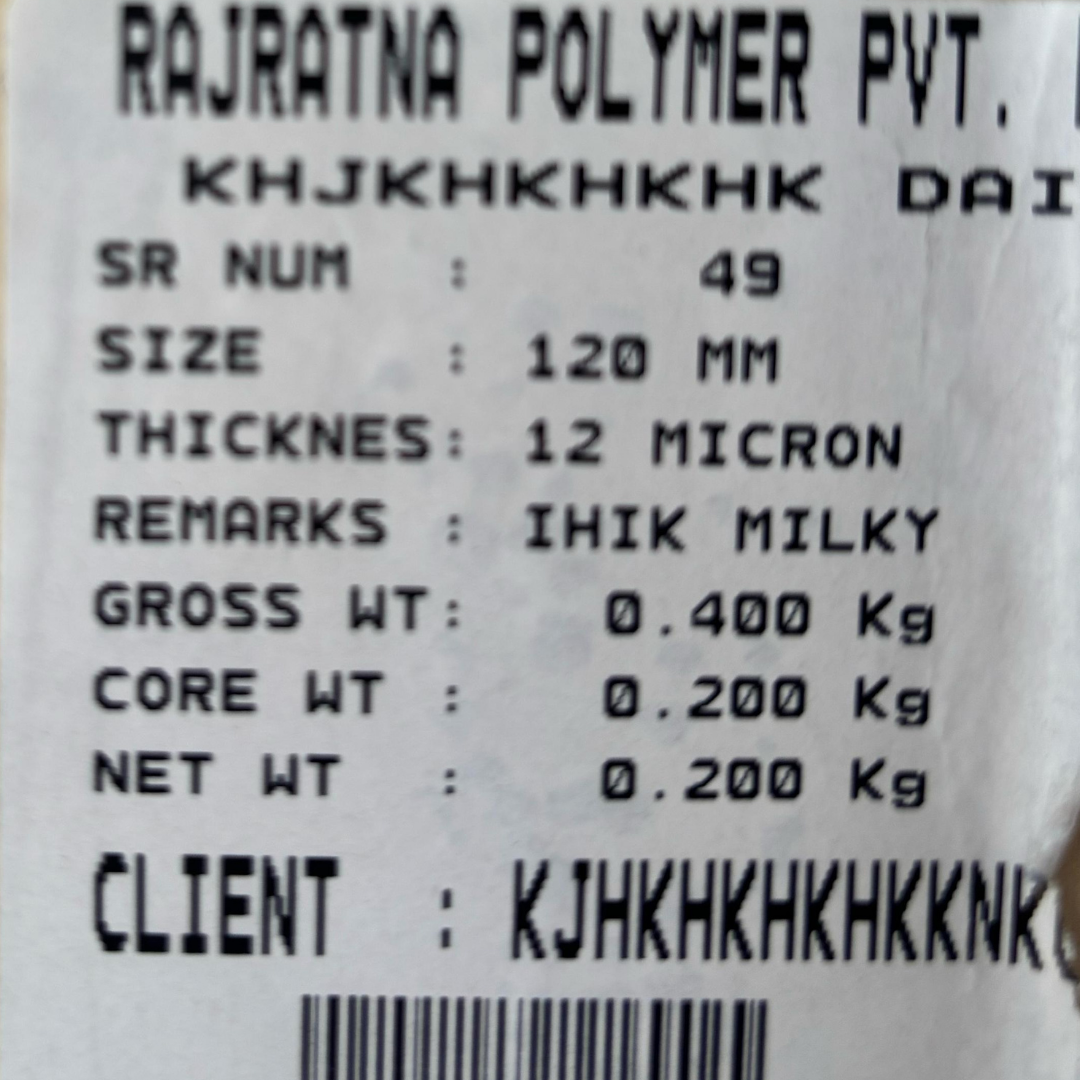
10. Real Labels Showing ERP-Ready Manufacturing Data
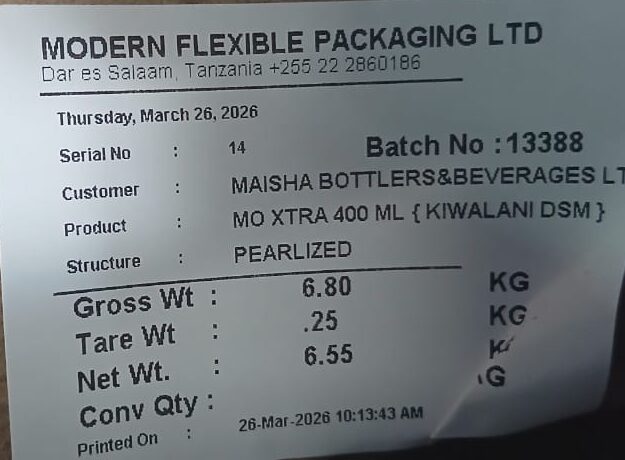
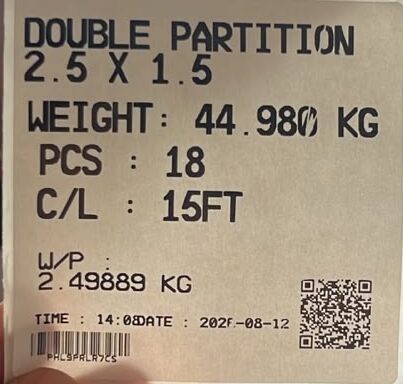
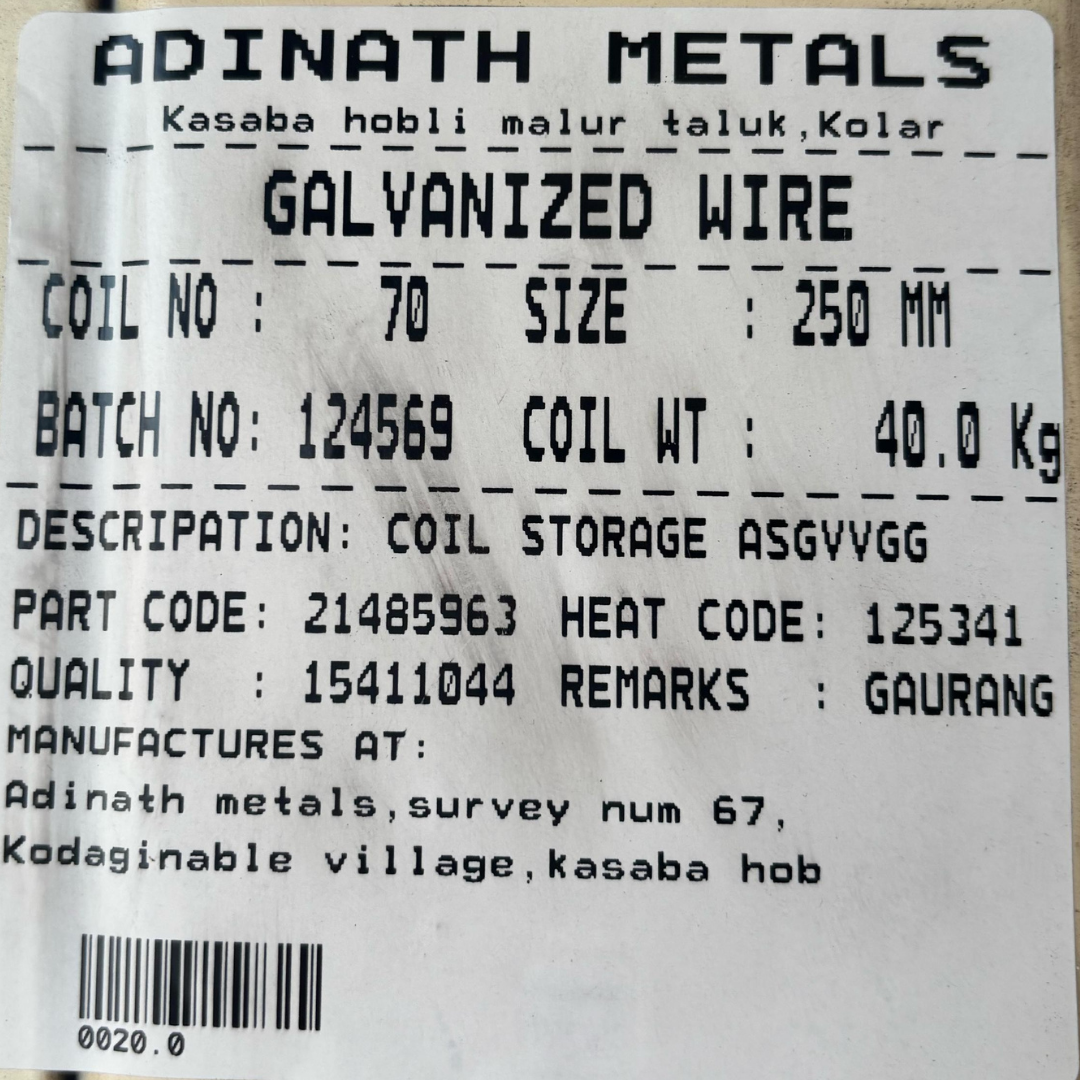
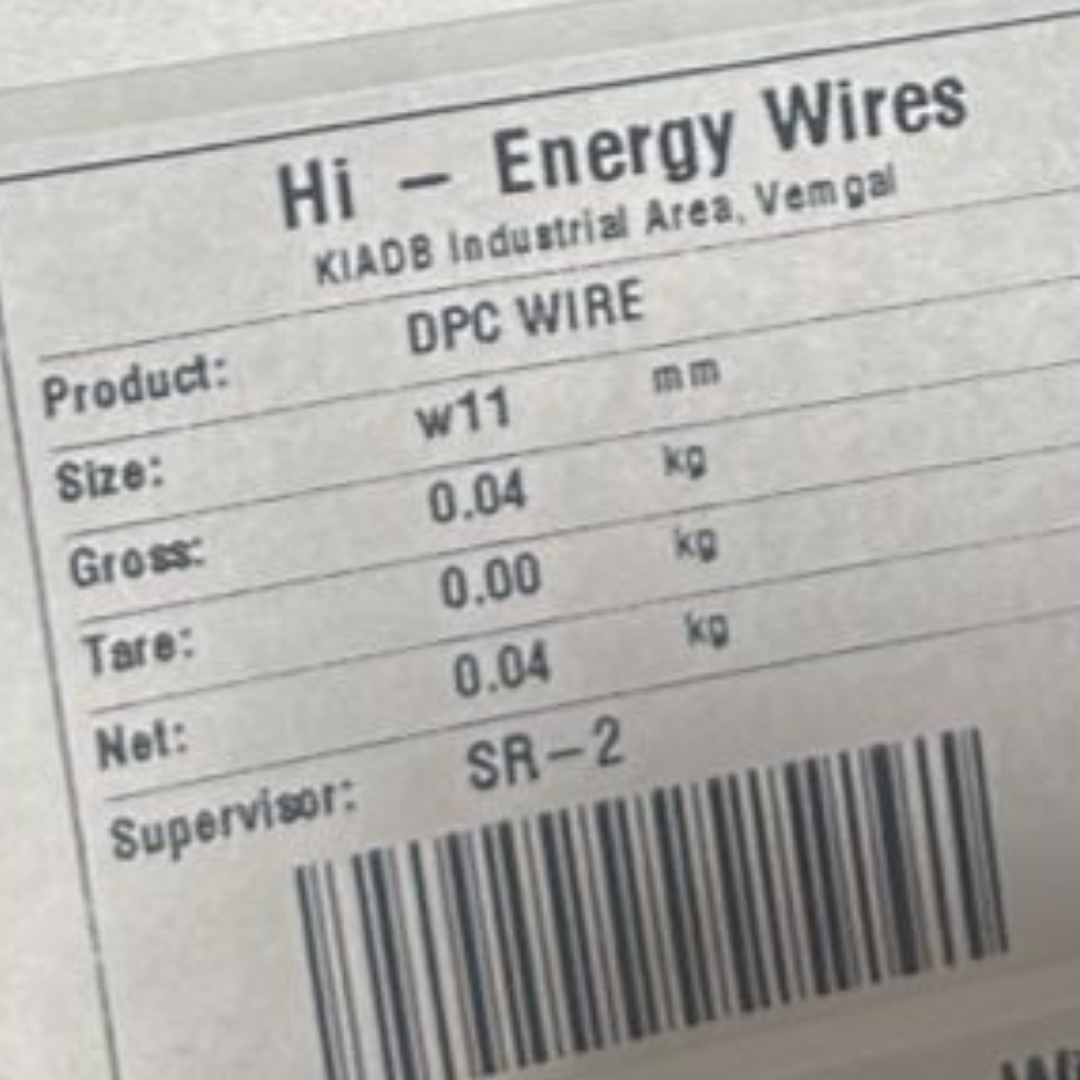
The following real customer label samples show the kind of data Punit Instrument Pvt. Ltd. can associate with a physical weighing transaction before that transaction is stored or integrated.
11. Inventory Integration: Weigh → Inward → Scan → Outward
ERP integration becomes more useful when it follows the actual physical inventory movement.
Punit ERP can maintain actual weight together with pieces, rolls, bags or other configured quantity units.
For the complete workflow, read How Punit Instrument Pvt. Ltd. Manages Inventory With Direct Weighing.
12. Packing Lists and Dispatch Can Be Connected to ERP Orders
A practical dispatch flow can begin with an ERP order and end with a verified physical outward transaction.
The packing list can be configured with fields such as:
- Customer
- Order number
- Product
- Barcode
- Individual bundle / roll weight
- Total rolls
- Total pieces
- Total weight
- Date
- Vehicle number
- Batch
- Other required fields
Punit ERP can also be configured to automatically email the packing list to management or customers.
13. Check Weighing + ERP: Send Only Accepted Transactions
Some manufacturers do not want every raw weighment to become an ERP confirmation.
For example, the order may require a package to remain within a defined weight range.
Punit ERP can apply:
- Target weight
- Minimum limit
- Maximum limit
- UNDER / OK / OVER
- Tower-light indication
- Conditional accepted-label printing
- Accepted / rejected record
Only the accepted transaction can then proceed to the next business step according to the configured workflow.
14. Case Study: Modern Flexible Packaging Ltd., Tanzania
Modern Flexible Packaging Ltd. uses Punit Instrument Pvt. Ltd. weighing automation in flexible-packaging manufacturing.
The roll is physically weighed and receives a label containing customer, product, structure, batch, gross, tare and net information. The same transaction can create roll-wise inventory in Punit ERP.
During dispatch, the warehouse scans the barcode, the exact physical roll is identified, inventory is reconciled and a packing list can be generated from the items actually selected.
This demonstrates the type of shop-floor data that can be synchronized with a larger ERP environment without forcing the operator to manually retype the weight.
15. Case Study: SPM Extrusion Pvt. Ltd.
SPM Extrusion Pvt. Ltd. uses Punit Instrument Pvt. Ltd. weighing automation for aluminium sections.
The operator can select the section, enter cut length and piece count, capture the actual bundle weight and automatically calculate average piece weight.
The transaction can maintain:
- Section / material
- Cut length
- PCS
- Actual KG
- Average piece weight
- Barcode
- QR
- Inventory status
This is a useful example of how shop-floor manufacturing data can be structured before being passed to an enterprise system.
16. Real Factory Videos
FMCG Client Case Study & Testimonial
Real use of Punit Instrument Pvt. Ltd. weighing and label printing in a customer environment.
SPM Extrusion Pvt. Ltd. — Aluminium
Live example of section, pieces, cut length, weight, barcode and connected inventory workflow.
Aluminium / Wire Industry
Real-time weighing, printing and inventory management in an active factory environment.
FMCG — JK Masale
Check weighing, label printing and inventory automation in production.
17. Can an Existing Weighing Scale Be Integrated With SAP or ERP?
Possibly. The main requirement is that the existing weighing indicator exposes usable weight data through a supported communication method.
Examples may include:
- RS-232
- USB
- Ethernet
- Bluetooth
- Other supported serial or network protocols
Compatibility depends on the specific indicator and protocol.
Read How to Print Real-Time Weight and Barcode From an Existing Weighing Scale.
18. Multi-Scale ERP Architecture
Larger plants may have many weighing stations that all need to connect to one enterprise system.
Punit ERP can provide a common operational layer so each weighing station does not need to independently implement the full ERP logic.
19. Permissions, Auditability and Transaction Control
Enterprise integration is not only about moving data. It is also about controlling who can create, edit or cancel transactions.
Punit ERP can support configured controls such as:
- Operator and administrator roles
- User login
- Transaction timestamp
- Edit / correction history
- Cancellation records
- Accepted / rejected status
- Inventory status
- Integration / sync status
For regulated industries, final compliance and validation depend on the customer’s intended use, SOPs, URS and validation process. Punit Instrument Pvt. Ltd. does not treat generic software features alone as proof of regulatory compliance.
20. When Direct ERP Integration May Not Be Necessary
A simpler system may be more appropriate when:
- There is only one small weighing station.
- Only a basic weight receipt is required.
- No central ERP exists.
- Inventory is not maintained through the weighing station.
- There is no barcode dispatch process.
- Local reporting is sufficient.
In those cases, Punit Instrument Pvt. Ltd. may recommend a simpler receipt-printing or standalone label-printing solution.
Read the Punit Instrument Pvt. Ltd. guide to choosing the right weighing scale with printer.
21. ERP Integration Discovery Checklist
Before starting a weighing scale SAP / ERP integration project, collect the following information:
- ERP name and version
- SAP ECC / S/4HANA or other environment where applicable
- Plant and warehouse structure
- Number of weighing scales
- Number of factories / sites
- Existing weighing indicator models
- Product / material master fields
- Customer and order fields
- Batch / lot requirements
- Barcode / QR format
- Required inbound data from ERP
- Required outbound data to ERP
- API documentation
- Middleware architecture
- Authentication / security requirements
- ERP acknowledgement method
- Offline / retry requirement
- Inventory inward/outward logic
- Packing-list requirements
- User roles
- Audit requirements
22. Frequently Asked Questions
What is weighing scale ERP integration?
It is the connection of physical weighing transactions with enterprise software so actual weight and related product, order, batch, barcode or inventory information can move between the weighing system and ERP.
Can Punit Instrument Pvt. Ltd. integrate weighing scales with SAP?
Yes. Punit Instrument Pvt. Ltd. can evaluate SAP integration according to the customer’s SAP environment, APIs, middleware, security requirements and approved scope.
What is Punit ERP?
Punit ERP is the industrial weighing, labelling, inventory and workflow platform developed by Punit Instrument Pvt. Ltd. It can act as the operational layer between physical weighing and enterprise systems.
Can SAP send production orders to the weighing scale?
Where the approved integration supports it, order, product, batch and other master data can be provided from SAP / ERP to Punit ERP for the shop-floor transaction.
Can actual weight be sent back to SAP?
Yes. Actual captured weight can be part of the confirmed outbound transaction according to the configured integration.
Can barcode and QR data be synchronized with ERP?
Yes. Barcode / QR identity can be included in the transaction where required by the integration design.
Can inventory inward and outward be integrated?
Yes. Punit ERP can support inventory inward/outward workflows and synchronize the required information with ERP according to the approved architecture.
What happens if ERP is temporarily unavailable?
The system architecture can include local transaction storage, pending-sync status and retry logic. The exact behaviour depends on the project’s connectivity and integration requirements.
Can multiple weighing scales connect to one SAP system?
Yes. Compatible weighing stations can connect through a centralized Punit ERP layer, subject to the approved system architecture.
Can an existing scale be connected to ERP?
Possibly. Compatibility depends on the weighing indicator’s communication interface and protocol.
23. Related Punit Instrument Pvt. Ltd. Resources
Planning a Weighing Scale SAP or ERP Integration?
Share your ERP environment, weighing hardware, material/order flow, required data fields, number of scales and inventory/dispatch process with Punit Instrument Pvt. Ltd..
Punit Instrument Pvt. Ltd. can evaluate the complete architecture around weighing hardware, Punit ERP, barcode/QR labels, inventory, dispatch, packing lists, reporting and SAP/ERP integration.
Explore Punit Instrument Pvt. Ltd. Weighing Scale With Printer Discuss Your SAP / ERP Integration