
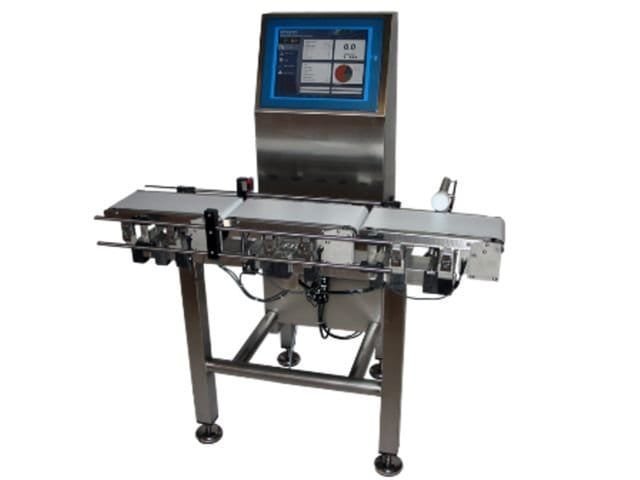
In every factory, warehouse, or production unit, inventory accuracy decides profitability.
From raw materials to finished goods, from inward to dispatch knowing what you have, what you used, and what’s left is critical.
Yet most companies still depend on manual stock entries, spreadsheets, and guesswork.
The result? Discrepancies, miscounts, wastage, and wrong deliveries.
The solution lies in one simple, transformative idea Direct Weighing Inventory Management. It’s not just weighing it’s connecting every weighment directly to your inventory, ERP, and production data, so every gram, kilo, and ton automatically updates stock in real time.
What Is Direct Weighing Inventory Management?
Direct Weighing Inventory Management means linking your weighing scale or system directly to your inventory software.
Whenever you weigh a material raw or finished the system automatically updates your stock quantity without manual entry.
- No counting.
- No typing.
- No errors.
Each weighing transaction is captured, stored, and synced to your live stock ledger automatically.
How Direct Weighing Inventory Works
Here’s how it functions in real operations:
- Integration – The weighing scale is connected to the computer or ERP system.
- Material Selection – Operator selects the material or product to be weighed.
- Weighing – When the material is placed on the scale, the weight is automatically captured.
- Stock Update – The software instantly updates inventory – inward or outward.
- Label Generation (optional) – A label or QR code can be printed for tracking.
- Reports & Analytics – Managers view real-time stock movement and balance reports.
Each weighment becomes a live inventory event, creating a traceable digital trail from material arrival to dispatch.
Why You Need Inventory Integrated with Direct Weighing
In a manufacturing environment, inventory accuracy = profit accuracy.
1. Eliminate Manual Errors
When inventory data is entered manually, human errors are inevitable.
With direct weighing, every entry is automated zero chances of mismatch.
2. Real-Time Stock Visibility
Every weighing instantly updates your system, showing exactly how much material is available in stock at any given time.
3. Prevent Material Wastage & Theft
When every inward and outward movement is tracked by weight, it’s impossible to misplace or misuse materials unnoticed.
4. Speed Up Operations
Manual stock updates take hours. Direct weighing does it instantly.
The system can even trigger reorder alerts based on live stock levels.
5. Audit-Ready Data
Every weighment is stored with time, operator, and batch information creating a full traceable record for audits and compliance.
6. Seamless ERP Integration
The system automatically updates purchase, production, and sales records, syncing stock data across departments.
7. Improved Production Planning
Since raw material consumption and finished product weights are recorded in real time, managers can track efficiency and plan future production more accurately.
Challenges of Manual Inventory Systems
If your inventory management is not connected to weighing, you may face:
- Duplicate or missing entries
- Inaccurate closing stock
- Material loss or wastage
- Time-consuming reporting
- Difficulty in traceability
- No integration between production and dispatch
In manual systems, the weight is measured separately, and the data is entered later creating opportunities for human error, delay, and mismatch.
Direct weighing eliminates this disconnect completely.
Components of a Direct Weighing Inventory Management System
| Component | Function |
|---|---|
| Digital Weighing Scale | Captures weight data from raw or finished goods. |
| Weighing Software | Connects the scale to the system and stores transactions. |
| Inventory Module | Updates stock automatically based on weighing data. |
| ERP Integration | Syncs stock data with production, purchase, and sales. |
| Label Printer | Generates QR or barcode labels for traceability. |
| Cloud Dashboard | Provides live reports, analytics, and remote monitoring. |
Use Cases of Direct Weighing Inventory
1. Raw Material Inward Control
When raw material enters the factory, the truck is weighed on a scale connected to the ERP.
The system automatically updates the “Raw Material Inward” entry no manual note or approval needed.
2. Production Tracking
During manufacturing, every roll or batch weighed adds to the “Finished Goods Inventory.”
The system automatically deducts used raw materials and adds produced output.
3. Dispatch Automation
When products are dispatched, weighing data automatically reduces stock levels and generates an invoice or delivery note.
4. Multi-Location Stock Sync
In companies with multiple warehouses, direct weighing syncs stock across all sites through a central cloud system.
5. Label-Based Traceability
Each weighing label contains a QR code. When scanned, it shows product, batch, weight, and status — enabling 100% traceability.
Industries That Benefit the Most
- Packaging & FMCG – Real-time stock control between production and dispatch.
- Chemical & Paint Manufacturing – Formula-based material tracking by weight.
- Steel & Metal Fabrication – Heavy raw material inward and output tracking.
- Textile & Non-Woven Fabric – Roll-level stock traceability using labels.
- Warehousing & Distribution – Automated stock update for inbound and outbound goods.
- Agriculture & Fertilizer – Bulk weighing for bags and loads.
- Food Processing – Traceability and batch control for compliance.
Benefits of Weighing-Based Inventory Control
- Zero Data Discrepancy
Weight data flows directly into inventory no manual intervention. - Real-Time Reporting
Get instant visibility into raw materials, finished goods, and stock value. - Optimized Production Planning
Managers can see exact consumption patterns and output efficiency. - Traceability and Accountability
Each weighment is logged with operator ID, date, and time. - Faster Dispatch and Billing
Automated weighing means faster turnover and seamless invoicing. - Centralized Control
Multi-location plants can view all stock data on one dashboard. - Audit Compliance
Every gram is tracked digitally, ensuring full transparency for audits.
Other weighing controls: direct weighing stock management, industrial weighing ERP, automatic inventory weighing, ERP connected weighing software, real-time factory weighing.
Key Features to Look For in a Weighing-Based Inventory ERP
| Feature | Description |
|---|---|
| Automatic Data Capture | Records weights directly from scale. |
| ERP Integration | Connects weighing data to production and dispatch. |
| Label Printing | Generates product labels with QR/barcode for traceability. |
| Cloud Dashboard | Centralized monitoring of all inventory data. |
| Multi-Scale Compatibility | Works with multiple scales simultaneously. |
| User Roles & Permissions | Secure access for operators, managers, and admins. |
| Custom Reporting | Production, inward, dispatch, and wastage reports. |
| Live Alerts | Notifies managers when stock crosses threshold levels. |
Others: weighing ERP features, automatic inventory update system, ERP connected label printing, multi-scale weighing management, warehouse automation software.
How to Implement Direct Weighing Inventory
Step 1. Identify Weighing Points
Find all areas where materials are weighed inward, production, packaging, and dispatch.
Step 2. Connect Hardware
Install digital scales with RS-232 or wireless connectivity.
Step 3. Integrate Software
Connect scales to your weighing ERP or inventory management system.
Step 4. Configure Material Mapping
Map products, raw materials, and SKUs to corresponding weighing stations.
Step 5. Automate Label Printing
Enable automatic label printing after each weighing for traceability.
Step 6. Go Live and Train Operators
Train teams on the new system for smooth adoption.
Step 7. Monitor, Audit, and Optimize
Use reports to track efficiency and detect any anomalies.
Keywords: weighing ERP implementation, inventory automation guide, warehouse weighing integration, real-time stock weighing, direct weighing setup.
ROI of Weighing-Integrated Inventory
Companies typically recover their investment in 3–6 months, through:
- Reduced manpower and paperwork.
- Fewer stock mismatches and losses.
- Faster production and dispatch.
- Better decision-making through live reports.
When implemented correctly, the system pays for itself by eliminating manual inefficiency and improving production throughput.
Future: IoT and Cloud Weighing Systems
Future-ready inventory systems are moving toward:
- IoT-connected weighing scales feeding live data to ERP.
- AI-based predictive stock alerts and reorder suggestions.
- Cloud weighing dashboards with real-time multi-plant insights.
- Mobile access for approvals and live reporting.
Conclusion
Direct weighing-based inventory management transforms how industries track and control materials. It eliminates guesswork, speeds up processes, and builds 100% transparency into operations. By integrating your weighing scale directly with inventory, every material movement becomes measurable, traceable, and reliable. Whether you run a packaging unit, factory, or warehouse, connecting your scales to your ERP isn’t just about automation it’s about accuracy, control, and growth.
In today’s industrial world, direct weighing isn’t optional it’s essential.
Frequently Asked Questions
It’s a system that links weighing scales directly to your inventory or ERP software, automatically updating stock in real time.
It eliminates manual entries, prevents errors, and provides real-time visibility of material flow.
Yes, most digital scales with RS-232 or Wi-Fi output can connect to ERP systems.
Manufacturing, packaging, warehousing, and logistics any sector dependent on weight-based materials.
Yes. Modern weighing ERPs offer direct or API-based integration with major business systems.
Most companies recover costs within 6 months through reduced manpower and error elimination.
Yes. Cloud-based systems provide centralized dashboards for all plants.
Weight, product name, batch number, operator, timestamp, and stock movement.
Yes. You can enable or disable it depending on traceability requirements.
All weighment records are stored digitally with encrypted backups and user permissions.