
A Complete Guide to Unmanned, ERP-Integrated & Automated Weighbridge Systems
Introduction
Every business that moves bulk materials steel, cement, coal, grain, waste, or construction aggregate depends on accurate weighing.
For decades, weighbridges have been the backbone of trade verification and logistics control.
But as industries scale, manual weighbridge operations fail long queues, data errors, and manipulation at weigh stations cost companies lakhs every year.
That’s why Weighbridge Software has become an essential tool for modern industries.
It transforms a traditional weighbridge into a digital, automated, and auditable system.
This comprehensive guide explains:
- What weighbridge software is.
- How automated and unmanned weighbridges work.
- How to choose the right software for your business.
- Why ERP integration and automation are critical for transparency and efficiency.
What Is Weighbridge Software?
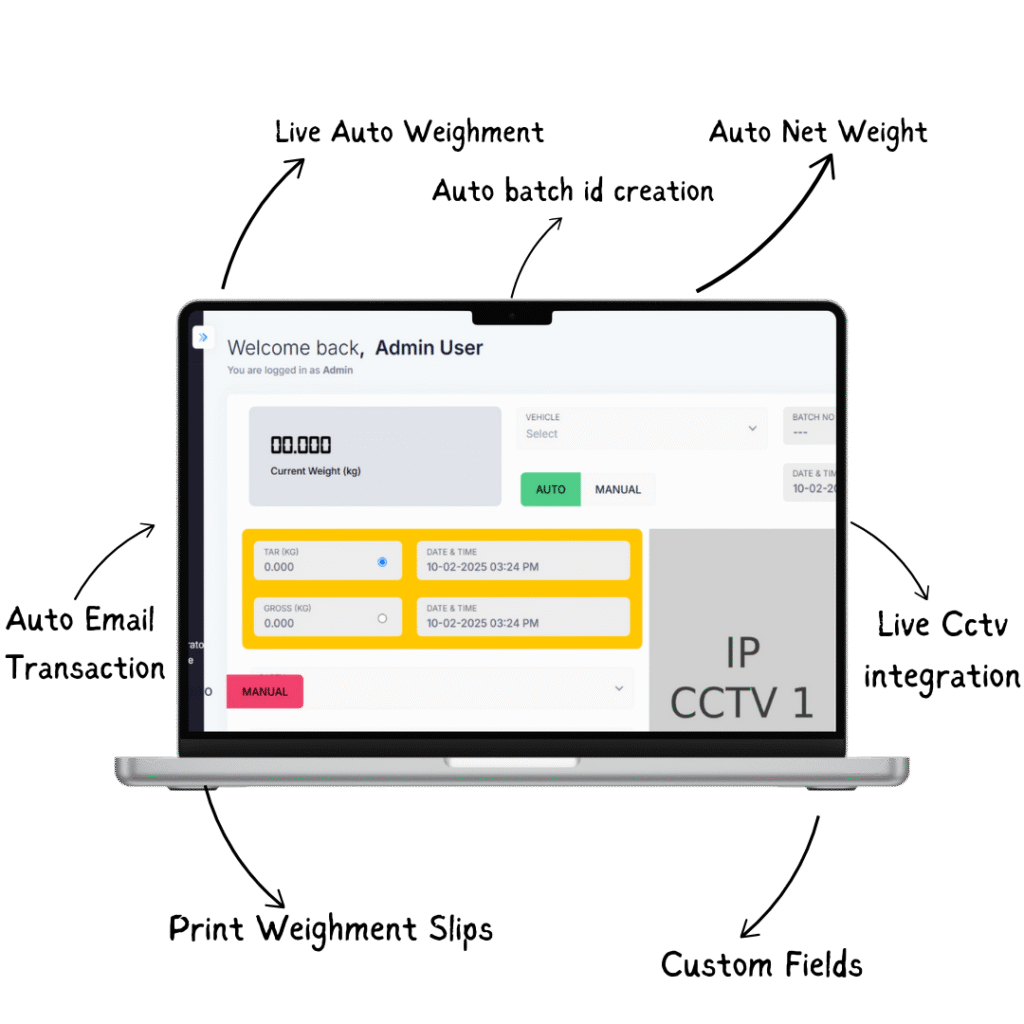
Weighbridge software is a digital system that records, manages, and analyses the weight data captured from a weighbridge (truck scale). It automatically captures gross, tare, and net weights, generates digital weight tickets, and stores them in a secure database that integrates with ERP, billing, and dispatch systems. Instead of relying on handwritten slips or Excel, weighbridge software ensures every transaction is accurate, traceable, and tamper-proof.
How Weighbridge Software Works
A weighbridge system consists of three main parts:
- Hardware: platform, load cells, junction box, indicator.
- Controller: PC or industrial terminal connected to the indicator.
- Software: the application that records and manages weighing data.
Step-by-step process:
- Vehicle enters the platform and is identified by RFID or vehicle number.
- Gross weight is captured automatically.
- Vehicle unloads material and returns for tare weight.
- The software calculates net weight (gross – tare).
- Ticket is generated and stored digitally, with date, time, operator, and material details.
- Data syncs with ERP, inventory, or billing systems.
The result is complete transparency and instant traceability for every transaction.
Why Every Industry Needs Weighbridge Software
In manual systems, operators record weights on paper tickets or Excel prone to error and manipulation.
The consequences include:
- Data tampering and pilferage.
- Misreporting of material movement.
- Long queues and inefficiency.
- No digital audit trail.
Weighbridge software eliminates all of these issues.
Key Benefits
- Automatic data capture zero manual entry.
- Real-time reporting and analytics.
- Faster truck turnaround times.
- Full traceability and compliance.
- Secure cloud backup of all weighment records.
- Integration with ERP and inventory management.
For logistics-heavy operations, it means fewer disputes, faster billing, and total control over inbound and outbound movement.
Types of Weighbridge Software
Different businesses require different levels of automation.
Below are all the major types of weighbridge software, with detailed features and ideal use cases.
1. Standard Digital Weighbridge Software
This is the foundation of weighbridge automation.
It records all weighment transactions digitally, eliminates manual registers, and generates secure weight tickets.
Features:
- Automatic gross, tare, and net calculation.
- Vehicle and material database.
- Printable weighment slips.
- Operator login and role management.
- Report export to Excel or PDF.
Used by: manufacturing units, small warehouses, transport companies.
2. ERP-Integrated Weighbridge Software
This version connects weighbridge operations with the company’s ERP system.
Each weighment automatically updates inventory, billing, and production records in real time.
Benefits:
- Eliminates double data entry.
- Live stock movement visibility.
- Streamlined logistics and billing.
Used by: cement plants, steel manufacturers, logistics parks.
3. Cloud-Based Weighbridge Software
Instead of local storage, data is hosted on the cloud accessible from any location through a secure web interface.
Advantages:
- Centralised control for multiple locations.
- Remote monitoring and reporting.
- Automatic backups and updates.
Best for: organisations with multiple sites or large distribution networks.
4. Unmanned Weighbridge Software
Unmanned weighbridge software represents the highest level of automation.
It operates the entire weighing process without human involvement.
Process flow:
- RFID or ANPR camera identifies the truck.
- Boom barriers open automatically.
- Sensors detect vehicle position.
- Weight is captured automatically.
- Ticket generated and stored digitally.
Key Features:
- 24×7 operation.
- Real-time monitoring via CCTV.
- Automatic ticket and SMS/email alerts.
- Integration with ERP and dispatch systems.
Used in: mining, cement, power plants, ports, bulk logistics.
5. Multi-Weighbridge Centralised System
Large enterprises often manage several weighbridges across plants or regions.
A centralised weighbridge data management system consolidates all weighment data on a single dashboard.
Benefits:
- Unified reporting for all locations.
- Fraud prevention through live monitoring.
- Instant analytics on material movement.
6. Weighbridge Software with Camera & RFID Integration
This version adds image and RFID-based security to eliminate tampering.
Features:
- Vehicle image captured during weighment.
- RFID tags verify authorised vehicles.
- Automatic ticket generation with timestamp and image proof.
Used by: high-security logistics, government weigh stations, toll operations.
Key Features of an Advanced Weighbridge System
| Feature | Description |
|---|---|
| Automatic data capture | Live reading from indicator without manual input. |
| ERP & inventory sync | Updates stock and billing modules instantly. |
| RFID/ANPR | Identifies vehicles automatically. |
| Multi-site dashboard | Manage multiple weighbridges remotely. |
| Audit trail | Tracks every transaction and user action. |
| Cloud backup | Secure storage and 24×7 data access. |
| Reporting & analytics | Custom reports by date, material, customer, or vehicle. |
| Ticket printing | Generates digital or physical tickets instantly. |
| Role-based access | Operator, supervisor, admin segregation. |
Industries That Depend on Weighbridge Software
- Cement and concrete plants.
- Steel and metal industries.
- Mining and quarry operations.
- Ports and logistics hubs.
- Agriculture and grain trading.
- Waste management and recycling units.
- Manufacturing plants handling raw material in bulk.
For each of these, accurate weight = accurate billing.
That makes automated weighbridge software a direct contributor to profitability.
Benefits of Weighbridge Automation
- Accuracy and consistency – No manual rounding or data loss.
- Faster operations – Reduces truck turnaround time.
- Data transparency – Prevents manipulation or fraud.
- Improved productivity – Less human involvement in repetitive tasks.
- Compliance & traceability – Digital records for audit.
- Cost efficiency – Saves manpower and eliminates paper use.
- Scalability – Easily expandable for multiple weighbridges.
How to Select the Right Weighbridge Software for Your Business
Choosing the right software depends on your operational requirements, scale, and industry.
Below is a step-by-step framework for decision-making.
1. Assess Your Business Requirements
Identify:
- Type of materials handled (bulk solids, liquids, aggregates).
- Volume of vehicles weighed daily.
- Locations and number of weighbridges.
- Need for unmanned or semi-automatic operation.
2. Define Integration Needs
Decide if you need:
- ERP integration (SAP, Tally, custom ERP).
- Inventory management linkage.
- Label printing or dispatch integration.
- API access for third-party systems.
3. Evaluate Security & Automation
Check whether the system supports:
- RFID/ANPR vehicle identification.
- CCTV snapshot integration.
- Automated ticket generation and digital signature.
4. Check Scalability and Support
A good weighbridge system should:
- Manage multiple locations.
- Offer cloud or on-premise deployment.
- Provide local technical support.
5. Prioritise Compliance and Data Reliability
Ensure that the software follows:
- Government-approved weighing standards.
- Tamper-proof database storage.
- Digital audit trail for every weighment.
6. Compare ROI
Calculate the cost of software versus manual error and delay losses.
Most enterprises recover their investment within months through accuracy and time savings.
Role of Unmanned Weighbridge Software in Smart Factories
Automation is moving beyond the production floor.
Unmanned weighbridge systems integrate IoT sensors, cameras, and RFID for 100% automated vehicle weighing a critical step toward Industry 4.0.
They reduce manpower dependency, eliminate fraud, and enable 24-hour continuous operations.
Integration with cloud dashboards and ERP transforms the weighbridge into an intelligent data hub, not just a measurement point.
Future of Weighbridge Software
The next generation of weighbridge technology focuses on:
- AI-driven anomaly detection (detecting unusual weight patterns).
- Predictive maintenance for load cells.
- Blockchain-based data verification for tamper-proof weighment records.
- Mobile apps for remote approval and monitoring.
Companies adopting these innovations will gain real-time control, reduce losses, and strengthen compliance frameworks.
Conclusion
Weighbridge software has evolved from a simple ticketing program into a complete logistics control system.
It ensures transparency, accuracy, and accountability across every stage of material movement.
Whether you need a standard weighbridge software, ERP-integrated system, or a fully unmanned weighbridge, the right solution can transform your operation into a fast, efficient, and fraud-proof ecosystem. By investing in digital weighbridge automation today, you build a foundation for data-driven growth tomorrow.
Frequently Asked Questions
It is a digital system that automates the weighing process, records truck weights, generates digital tickets, and integrates data with ERP or inventory modules.
An automated system that performs the entire weighing operation without human intervention using RFID, ANPR, and sensors.
It connects weighbridge transactions to ERP, updating stock, dispatch, and billing instantly for real-time visibility and control.
Yes. It uses encrypted connections, role-based access, and automatic backups to ensure data integrity.
Identify your weighing volume, need for automation, integration requirements, and compliance standards. Choose software that fits your workflow and scale.
Zero manpower, 24×7 operation, accurate records, fraud prevention, and faster vehicle turnaround.
Yes. Multi-weighbridge or cloud-based systems consolidate data from multiple sites into a central dashboard.
RFID tags on vehicles automatically identify and log weighments, ensuring authorised and traceable operations.
Cement, steel, logistics, mining, ports, agriculture, and waste management.
Most users recover costs within months through reduced manual errors, labour savings, and improved data accuracy.
